Automation Concept
This was a discovery project that allowed me to explore a new direction for the core Teachable product. While the project itself wasn’t fully realized, it also wasn’t shelved. The research insights gathered became valuable and informed several other initiatives moving forward.
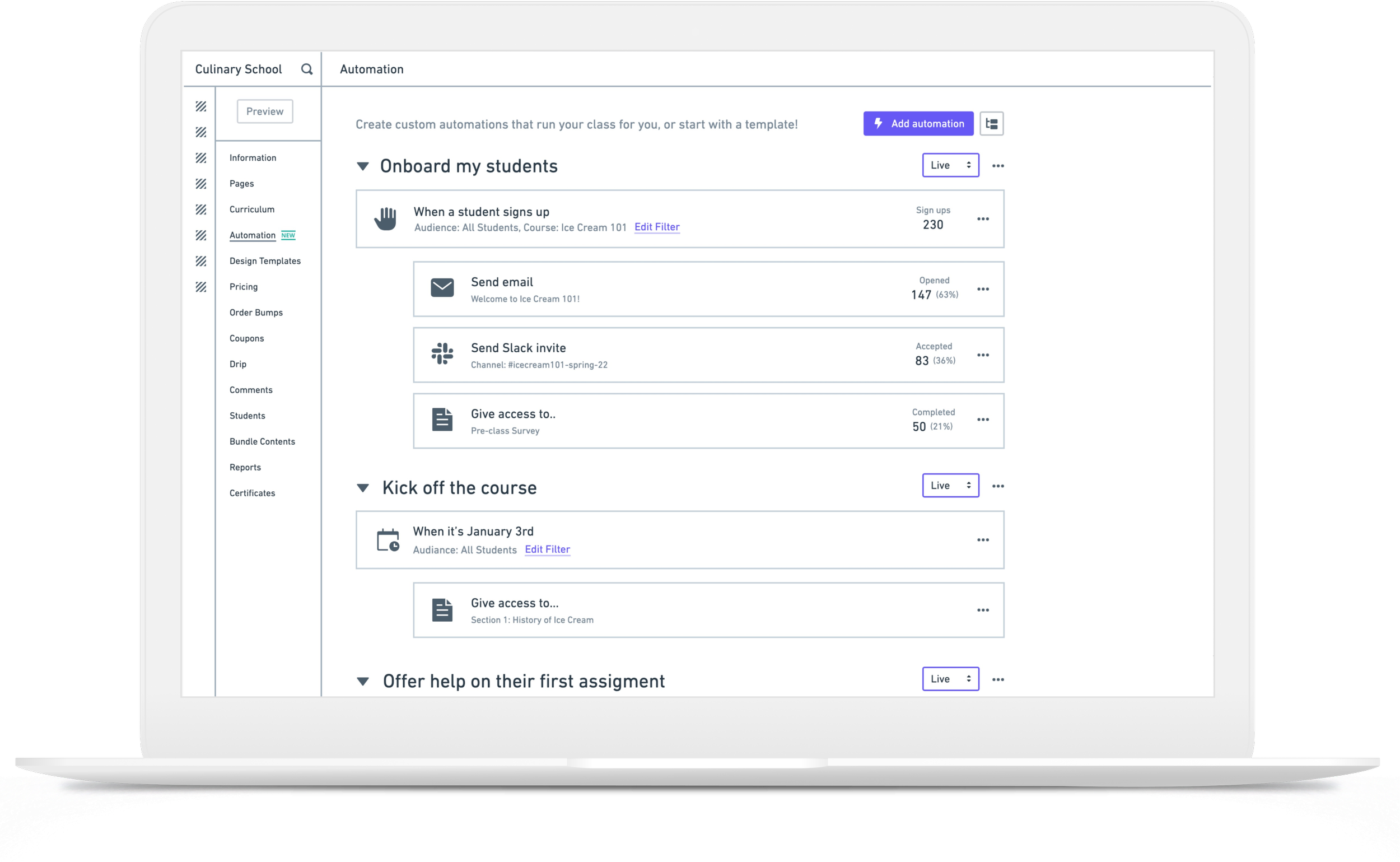
Background
The core product strategy
In 2023, our core strategy—driven by research—focused on transforming our platform from a static, self-directed learning experience into a dynamic, instructor-led learning program.
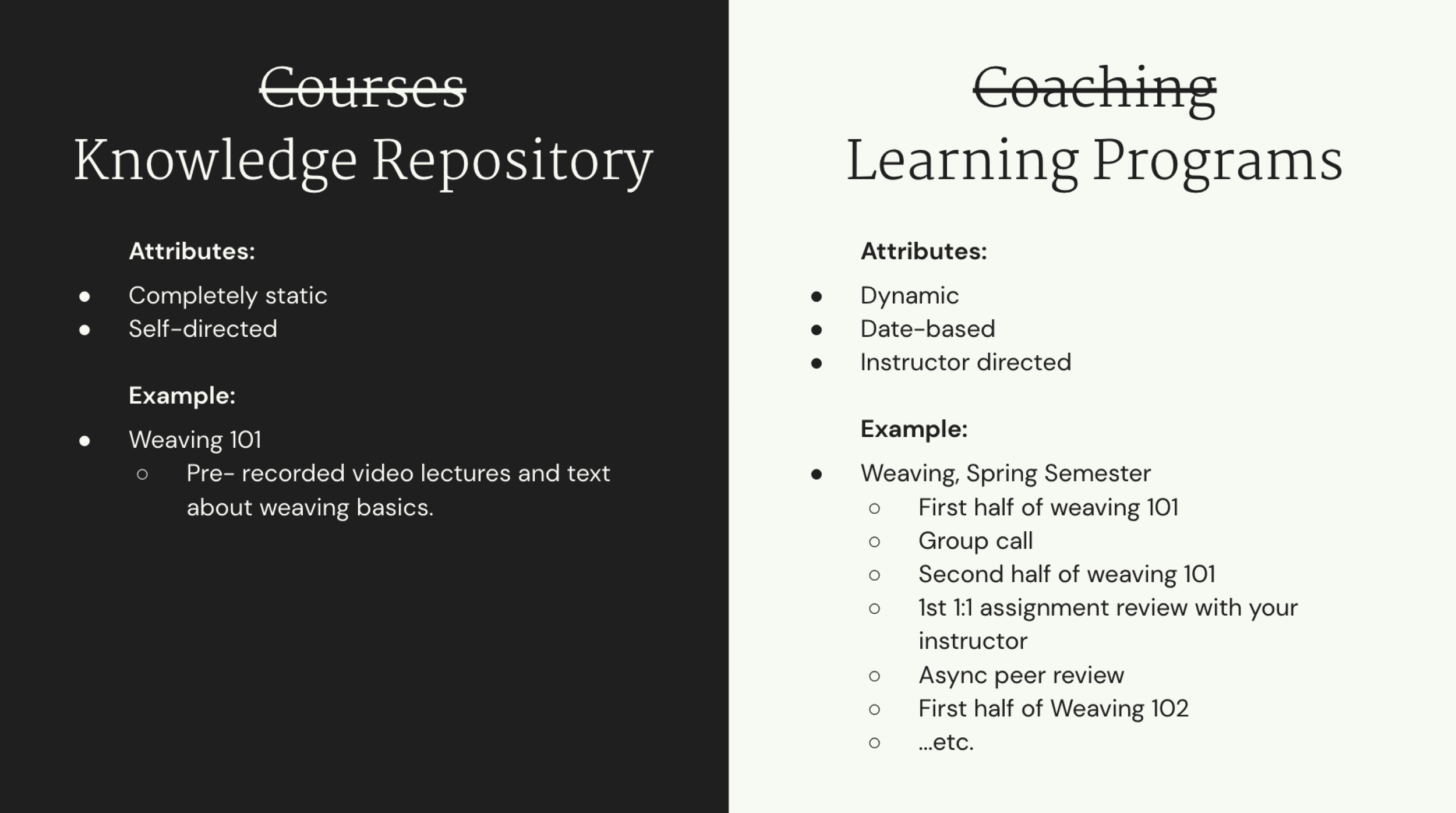
Our Assumption
“Our industry has knowledge products wrong. Online courses are workflows—a smart curriculum where resources, interactions, and personalization connect to create seamless learning journeys.”
My Role
I led a small tiger team which consisted of a User Researcher, a Product Strategist, a Visual Designer and two Engineers. Within 8 weeks, we worked with the Teachable leadership team to align on project understanding goals, research user needs, validate our assumptions and design and validate concepts.
The Process
Before initiating user research, we conducted a workshop with the leadership team to align on their vision for the core product, define how they wanted to see our users evolve, and identify key metrics and potential risks.
Phase 1: The Research
Determining the research method
To validate our assumptions, we aimed to gain a deeper understanding of our users' workflows, pain points, and desires. Collaborating with our user researcher, I chose the Jobs to Be Done (JTBD) map framework for our research approach. This method allows us to break down the specific steps users take to achieve their goals. The resulting job map provides a structured way to capture all user needs related to the core functional tasks, helping us systematically identify opportunities for improvement and growth.
Conducting an internal workshop
We knew that we had experts in the company within the customer success team and customer support teams that had a good understanding of our users processes and workflows. Conducting the internal workshop helped us to understand high level user jobs which then enabled us to develop a research plan.
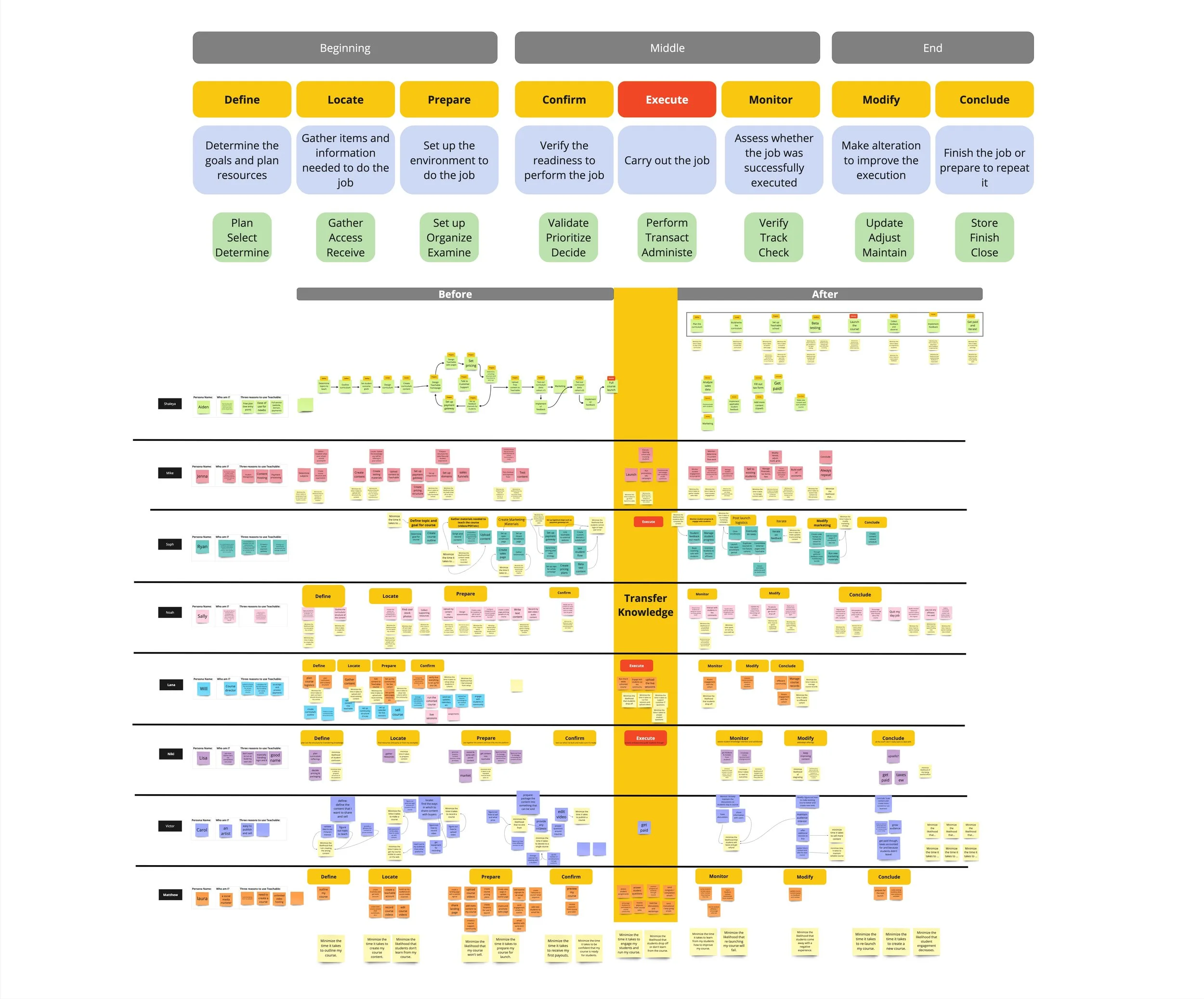
Job map from internal workshop
Conducting Research with real users
We identified and recruited both active Teachable users and non-Teachable knowledge creators for interviews. During the sessions, we took notes in Miro, which were later distilled and organized into a job map format for clearer insights and analysis.
Interview notes
Notes consolidated into a Job map
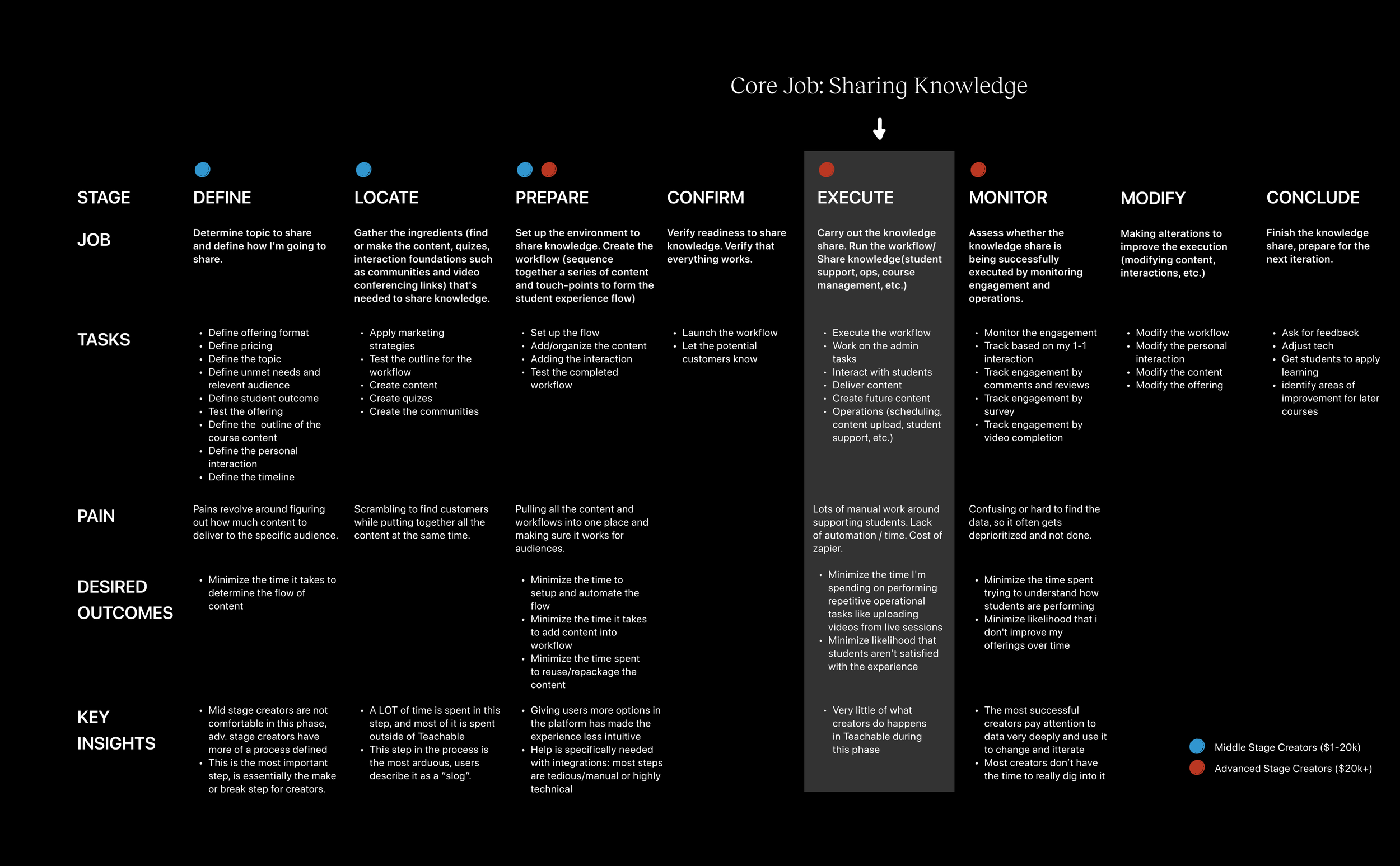
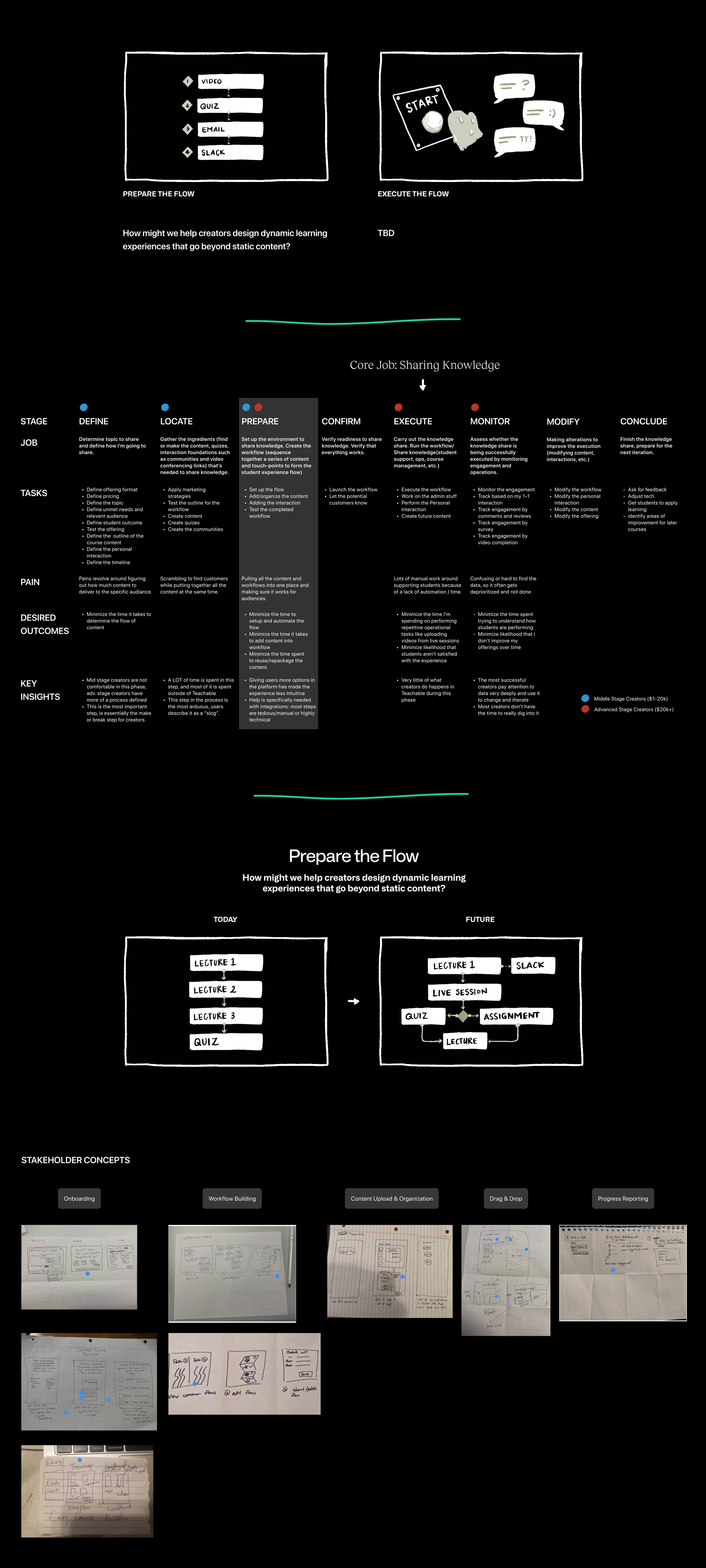
Finalized Job to be done map
Based on the research, we were able to ascertain the core job of a knowledge creator (Execute, carry out the knowledge share) and understand the tasks, pain points and desired outcomes of each step in the process.
Secondary Research
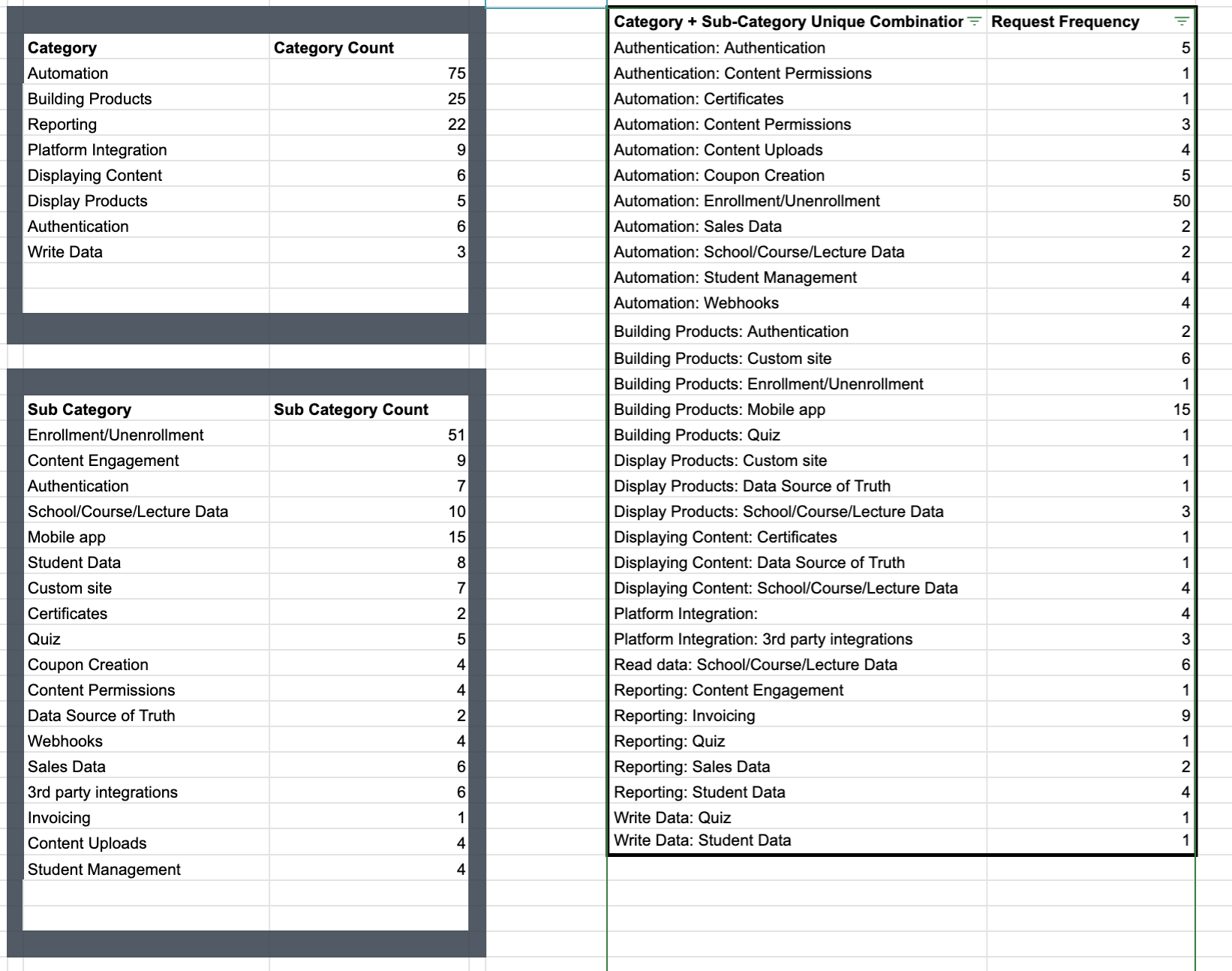
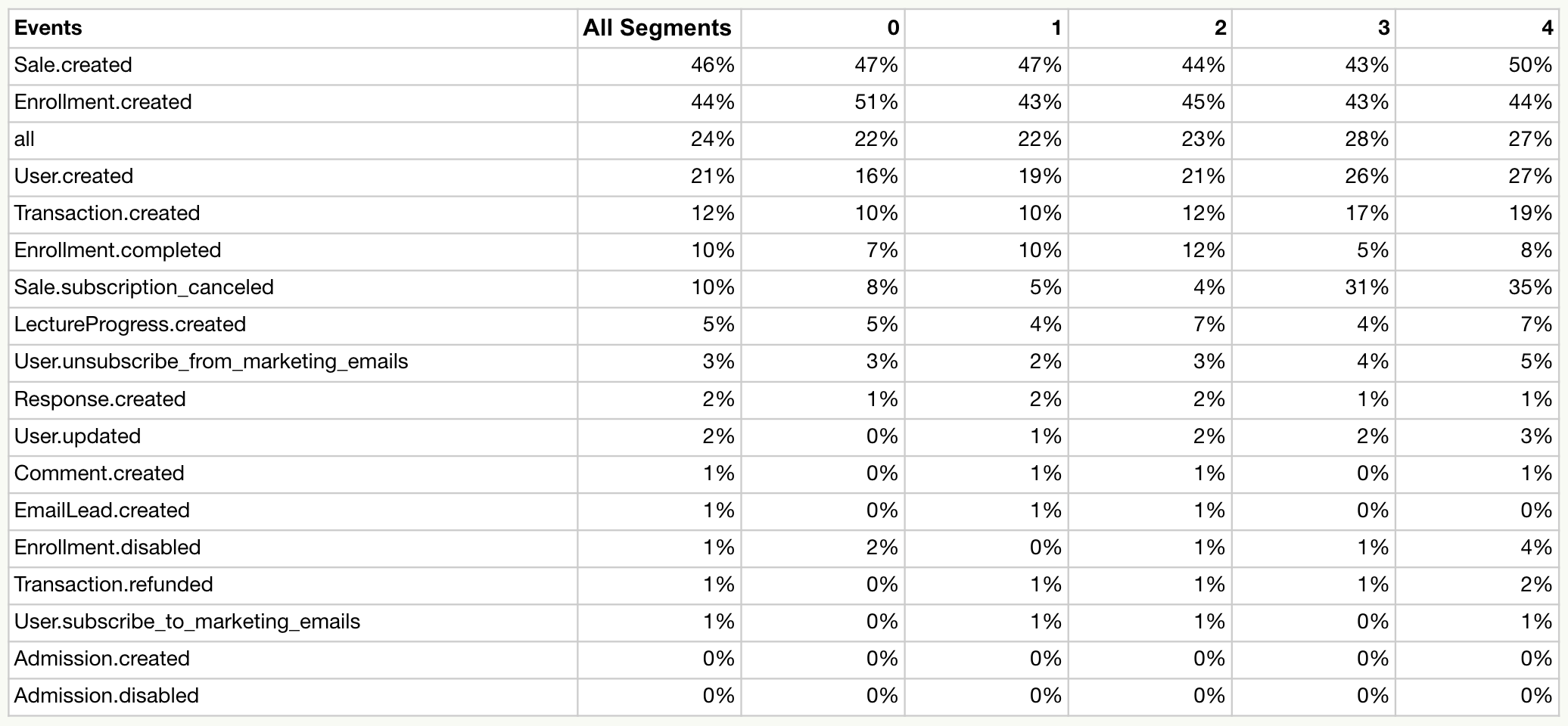
Beyond user research, we analyzed customer requests, where it became clear that automation features were among the top requests. Additionally, data on webhook usage showed high activity around enrollment and user-created events, indicating that users were already building their own automations based on these events.
Zendesk feature requests
Webhooks usage report (Dec 2021)
What we learned
The primary job of a knowledge creator is to “Make money by sharing knowledge online”
We were able to validate our hypothesis that Online courses are workflows made up of content, interactions and personalization which are all connected together to form a learning journey stitched together with various tools (Zapier) and carried out by the Instructor or an operations assistant.
Phase 2: Concept testing
In this phase, the goal was to test the initial design concepts and validate our hypothesis by gaining a deeper understanding of user needs around creating and executing their learning workflows.
Ideation workshop
I ran an ideation workshop with the leadership stakeholder team, starting with a research share-out to align on key areas of opportunity. To kick off the workshop, we began by formulating a "How Might We" question to frame the problem space. This question helped guide our brainstorming sessions and ensure that our ideas were focused on solving user pain points and unlocking growth opportunities. From there, we generated a wide range of ideas and ensured that all perspectives were considered in shaping potential solutions.
The Initial Concept
From the ideation workshop, where participants aligned on the goals and sketched out various concepts, we developed the idea for a course workflow automation tool. This tool would allow users to design their courses using a workflow model with if/then/else logic, enabling an automated and dynamic program setup. By incorporating automation, this solution saves creators time, manual effort, and costs while providing a more engaging, personalized experience for their students.
Validating with users
We validated the concept from the ideation workshop with 3 users to assess desirability, needs and understand their use case for the concept. The key question we asked when testing this concept with users is “How does this product add value for you?”. From this, we obtained a further understanding of the different customer use cases which helped to to explore the concept further.
Generating More concepts
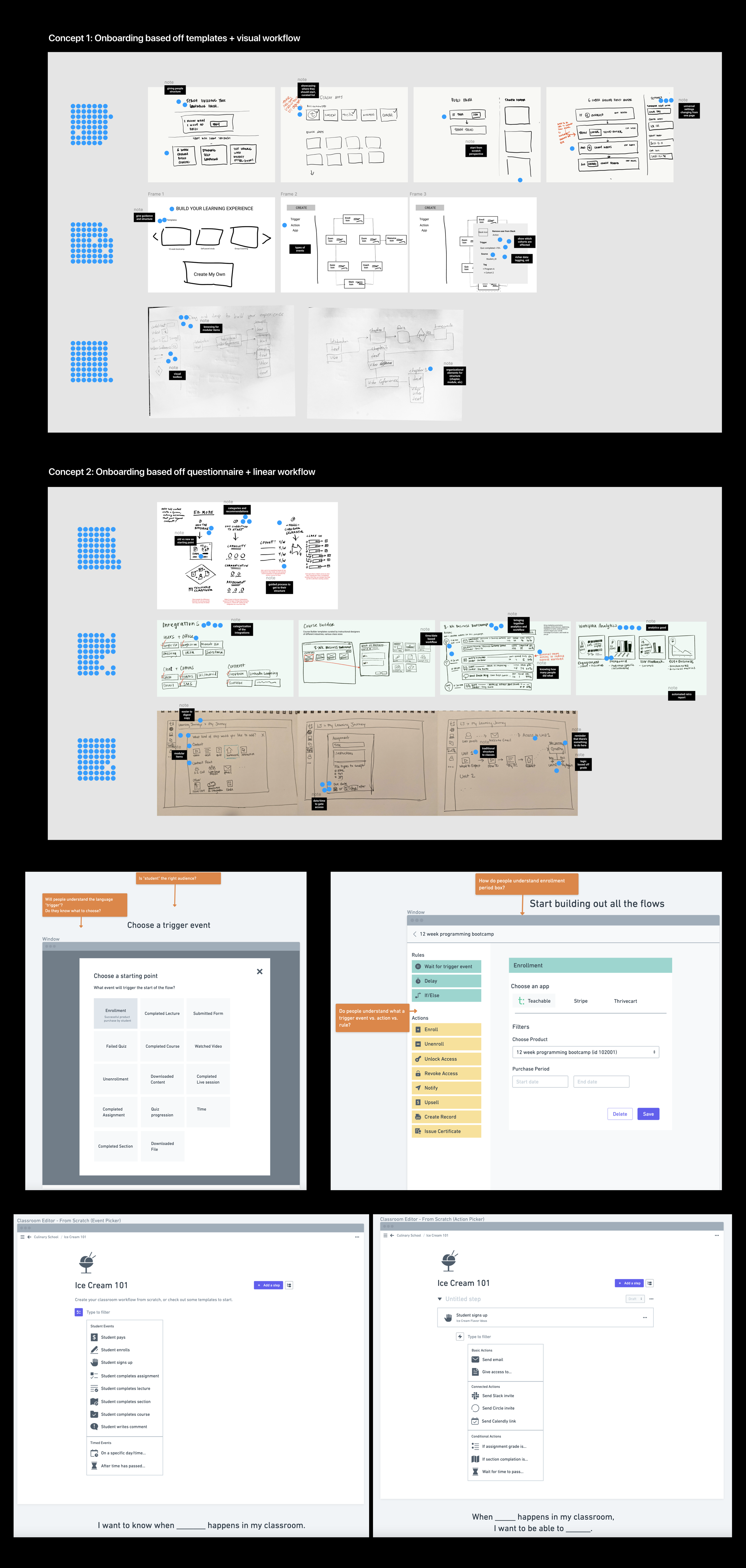
Based on the validated concept and use cases that were further fleshed out, our tiger team ran a design workshop to develop two prototypes for further testing with users. For the design sprint, we wanted to address the problem of “How might we help creators create a dynamic, evolving learning experience that goes beyond content” with the goal of helping users reduce maintenance time when creating and running a dynamic experience for students. The design sprint resulted in two concepts that we further tested with users.
Concept 1
We focused on the “prepare the workflow” and “execute the workflow” job steps in the job map. Concept 1 was designed to gather users feedback around a future concept of “workflows” and the extent they find it useful. The interviews for this round were designed to gather high level feedback around the concept of workflow and not the specific features and functionalities.
Concept 1
What we learned from Concept 1
Overall, the concept of workflow received positive feedback from participants.
Most participants mentioned the concept of Workflow is most helpful when it’s included within Teachable, not as a separate product. A creator mentioned that they would rather do things manually than learn another platform.
Participants found similarities between the Workflow and Zapier because of the automation aspect of the Workflow. However, they expressed that the benefits of the Workflow goes beyond automation as they can create a learning journey in one place. In addition to that, Zapier can be confusing and complex for less technology savvy users.
The automation of the communication was identified as a familiar feature of the Workflow. Users expressed positive feedback around other aspects of the automation, such as gated access to content and community based on timeframe or specific actions.
Advanced creators who may have a process and are paying for various tools, including Zapier, might not use this product right away. However, there is an opportunity to convert them when their subscriptions with tools end.
Reliability is key. If there is a failure, notification is really important and the ability to monitor automations is also important for troubleshooting
Simplicity in onboarding. The design should be easy to use and set up. This is where templates, integrations, etc. is important. We also shouldn’t overwhelm with many options.
Concept 2
We created a simplified Concept 2 to define and validate what would features and functionality would be valuable for an initial MVP.
What we learned from Concept 2
Overall, different automation aspects were interesting to participants. They were able to think about different possibilities to improve their courses, things that they’re not doing now, and didn’t even really think about.
Event-based dripping vs time-based dripping received positive feedback from participants, as it’s a unique feature that is currently missing in Teachable .
Some participants understood the concept of program as they already bundle their courses in one place. However, the term “Program” can be confusing to some users if they only create separate courses within their schools. The new set of terminology need to be created as new features are built.
Participants did not find the onboarding as a critical part of the process. Some were looking for a way to skip onboarding to get to content creation.
Participants found the integration page out of place. They expect to set up the integrations at the school level, such as setting, instead of repeating the process for every course.
The calendar view for scheduling was confusing to some participants. Those with self-paced courses did not find it helpful since they don’t set a time for different parts of their courses. Others were confused if it was a calendar for their tasks or their students and didn’t find it valuable in overall.
The curriculum editor and search were found interesting and valuable by participants, though some improvements need to be made to make the distinction between the content within (lecture, course, quiz) Teachable and outside (videos, pdfs, etc) of Teachable .
They expressed a desire for more features within quizzes.
Overall findings
A workflow as a new concept inside Teachable received positive feedback and there is an opportunity for Teachable to invest in this concept. This finding supports the primary hypothesis. The workflow features and functionalities to help users create and maintain their workflows still need to be explored. The current MVP design received some valuable feedback that can be used to improve and establish a new set of features and functionalities that can better support users in creating workflows within Teachable.